Public Key Infrastructure
Demystify PKI by explaining its key components such as digital certificates, public and private keys, and certificate authorities and demonstrating how they work together to authenticate identities and secure data exchanges.
Building Blocks of Public Key Cryptography
To understand how PKI works, it’s important to go back to the basics that govern encryption in the first place.
Symmetric Encryption
Symmetric encryption is a cryptographic method in which the same secret key is used for both encrypting and decrypting data. This means that both the sender and the recipient must have access to this single key.
Example
Consider a scenario where Bob wants to send a confidential message to Alice:
- Encryption: Bob writes his message and encrypts it using a secret key.
- Transmission: He then sends the encrypted message to Alice.
- Decryption: Upon receiving the message, Alice uses the same secret key to decrypt it and read the content.
Limitations
- Key Distribution: Sharing the secret key securely between parties can be challenging. If the key is intercepted or compromised during transmission, the security of the encrypted data is at risk.
- Lack of Authentication: Since symmetric encryption uses only one key, it does not inherently verify the identity of the sender, making it vulnerable to impersonation.
Asymmetric Encryption
- Asymmetric encryption solves the key exchange problem that plagued symmetric encryption. It does so by creating two different cryptographic keys, a private key and a public key. The public key is shared openly, while the private key is kept secret by its owner.
- This approach ensures that anyone can encrypt a message using the public key, but only the holder of the corresponding private key can decrypt it.
Example
Consider a scenario where Bob wants to send a confidential message to Alice:
- Encryption: Bob obtains Alice’s public key (which is freely available) and uses it to encrypt his message.
- Transmission: Bob sends the encrypted message to Alice.
- Decryption: Upon receiving the message, Alice uses her private key (which only she possesses) to decrypt and read the message.
Limitations
- Performance: Asymmetric encryption typically requires more computational resources and is slower compared to symmetric encryption. This makes it less ideal for encrypting large amounts of data.
Digital Signature
- Digital signatures are a way to prove who sent a message and ensure that the message wasn’t changed.
- They work with asymmetric encryption, meaning the sender uses their private key to create a unique signature, and the receiver uses the matching public key to verify it.
Example
Consider Bob wants to send a secure message to Alice:
- Encryption: Bob encrypts his message using Alice’s public key. This step ensures that only Alice, who possesses the corresponding private key, can decrypt and read the message.
- Digital Signing: After encrypting the message, Bob signs it using his private key. This digital signature serves as a unique marker that confirms the message was indeed sent by him, providing non-deniability.
- Transmission: Bob sends the encrypted message along with the digital signature to Alice.
- Decryption and Verification: Upon receiving the package, Alice first decrypts the message using her private key, retrieving Bob’s original text. She then uses Bob’s public key to verify the digital signature. A successful verification assures her that the message has not been altered and that it truly originates from Bob.
Man-in-the-Middle Attacks: Key Exchange Vulnerability
While the above process with asymmetric encryption and digital signature is secure in theory, its safety heavily depends on the proper distribution and verification of public keys. A common risk is a man-in-the-middle attack, which targets the exchange of these keys.
Example
- Public Key Transmission: Bob sends his public key to Alice so she can verify his digital signature.
- Interception and Replacement: During transmission, an attacker named Eve intercepts the public key and replaces it with her own.
- Impact on Verification: Alice receives Eve’s key instead of Bob’s and uses it to verify the digital signature.
- Message Interception and Tampering: With control over the key exchange, Eve can intercept messages. This enables her to read messages from Alice that are meant to be private, modify their contents, or even send altered messages to Bob.
- Undetectable Interference: Neither Alice nor Bob is aware that their messages are being intercepted or altered by Eve.
Why do we need PKI?
- PKI resolves the key exchange vulnerability by issuing and governing digital certificates that confirm the identity of people, devices or applications that own private keys and the corresponding public keys.
- In short, PKI assigns identities to keys so that recipients can accurately verify the owners. This verification gives users confidence that if they send an encrypted message to that person (or device), the intended recipient is the one who will actually read it and not anyone else who may be sitting as a “man in the middle”.
Design
Public key infrastructure protects and authenticates communications between servers and users, such as between your website (hosted on your web server) and your clients (the user trying to connect through their browser). The main components of public key infrastructure include the following:
- Certificate authority (CA): The CA is a trusted entity that issues, stores, and signs the digital certificate. The CA signs the digital certificate with their own private key and then publishes the public key that can be accessed upon request.
- Registration authority (RA): The RA verifies the identity of the user or device requesting the digital certificate. This can be a third party, or the CA can also act as the RA.
- Certificate database: This database stores the digital certificate and its metadata, which includes how long the certificate is valid.
- Central directory: This is the secure location where the cryptographic keys are indexed and stored.
- Certificate management system: This is the system for managing the delivery of certificates as well as access to them.
- Certificate policy: This policy outlines the procedures of the PKI. It can be used by outsiders to determine the PKI’s trustworthiness.
Steps to Get a PKI Certificate
- Select a Certificate Authority (CA)
- Choose a trusted CA that issues certificates (for example, Let’s Encrypt, DigiCert, etc.).
- Generate your key pair and CSR.
- Use OpenSSL to generate a private key and a Certificate Signing Request (CSR).
1
2
3
4
5
 # Generate a 2048-bit private key
 openssl genrsa -out domain.key 2048

 # Generate a CSR using the private key
 openssl req -new -key domain.key -out domain.csr
- During the CSR generation, you’ll be prompted to enter information such as your domain name and location.
- Submit the CSR
- Send your CSR to the CA via their portal or email, following their submission process.
- Complete the Domain Ownership Verification
- The CA will provide a challenge to confirm you control the domain. This may include:
- Email Verification: Clicking a link sent to a domain-associated email address.
- DNS Verification: Adding a specific TXT record to your domain’s DNS settings.
- HTTP Verification: Uploading a designated file to a specific directory on your website.
- Follow the CA’s instructions to complete the challenge.
- The CA will provide a challenge to confirm you control the domain. This may include:
- Receive Your Certificate
- Once domain control is verified, the CA issues your certificate.
Chain Of Trust
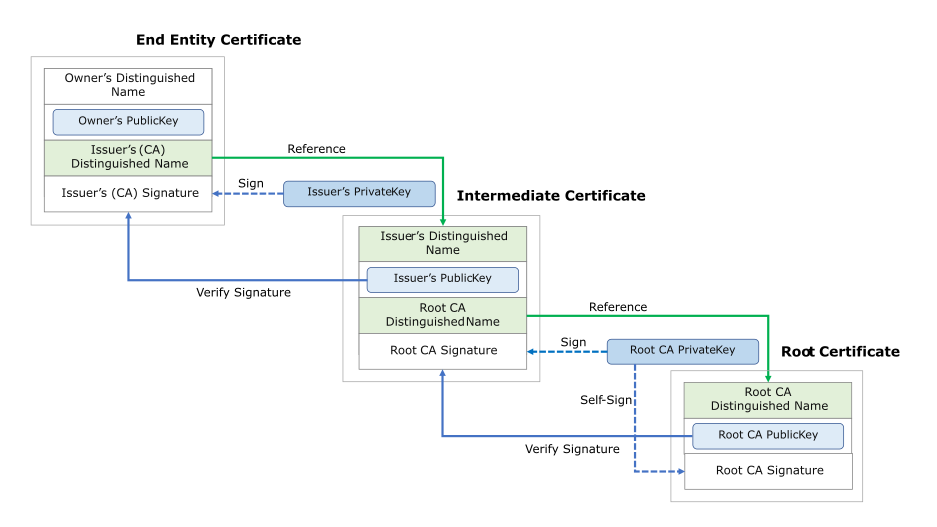
Owner’s certificate (End-Entity)
- Issued To:
- A website or service.
- Contains:
- Owner’s Distinguished Name: This identifies the owner (example the website’s domain like www.example.com).
- Owner’s Public Key: The public key belonging to the end-entity (the site or user).
- Issuer’s (CA) Distinguished Name: The identifier for the intermediate CA that signed/issued the certificate.
- Issuer’s (CA) Signature: A digital signature generated by the issuing CA (an Intermediate CA) using its private key.
- Additional Fields: Validity period, key usage, and other extensions.
- Retrieval:
- The browser retrieves this certificate from the web server during the TLS handshake.
Issuer’s Certificate (Intermediate CA)
- Role:
- The intermediate CA signs the server certificate.
- Retrieval:
- The browser sees that the server certificate is signed by an intermediate CA.
- The browser fetches the Issuer’s Certificate (usually sent by the server or fetched from a repository).
- Contains:
- Owners’s (CA) Distinguished Name: Identifies the intermediate CA.
- Owners’s (CA) Public Key: The public key belonging to the intermediate CA.
- Issuer’s (Root CA) Distinguished Name: The name of the root CA that signed the intermediate certificate.
- Issuer’s (Root CA) Signature: The signature generated by the Root CA using its private key.
- Verification Process:
- The browser uses the issuer’s public key (from intermediate CA certificate) to verify the digital signature on the server certificate.
- The browser ensures that the certificate is not expired or revoked.
- If valid, the browser moves to the next step.
Root CA Certificate
- Role:
- Acts as the trust anchor for the certificate chain.
- Contains:
- Owner’s (Root) Distinguished Name: Identifies the Root CA.
- Owner’s (Root) Public Key: The public key used to verify signatures made by the Root CA.
- Digital Signature: Typically self-signed (the Root CA signs its own certificate).
- Verification Process:
- The browser uses the Root CA’s public key, which is stored in its trusted certificate store, to verify the digital signature on the intermediate certificate.
- It checks that the intermediate certificate is within its validity period and not revoked.
- Trust:
- The Root CA Certificate is stored in a trusted certificate store (built into your operating system or browser).
- If this verification is successful, the entire certificate chain (server → intermediate → root) is considered valid.
Why do we need Certificate Chain?
- Security: The root CA’s private key is highly sensitive and kept offline to prevent compromise. Intermediate CAs issue certificates instead, reducing risk.
- Containment of Compromise: If an intermediate CA is compromised, only the certificates it issued are affected. This layered approach protects the integrity of the root.
- Scalability: A root CA can’t handle signing every certificate, so intermediates distribute the workload efficiently.
- Flexibility: Different intermediates can enforce different policies for various use cases.